
An APN is a set of carrier instructions that tells your phone how to reach the internet over mobile data. Your phone normally receives those instructions with the SIM or eSIM profile.
If you use Atli, you do not need to type an APN. It is configured automatically. When data does not connect after you arrive, check which eSIM is selected for mobile data and whether data roaming is on before opening any advanced network menus.
What does APN mean?
APN stands for Access Point Name. Despite the name, it is not the name of a WiFi network and it is not a password. It identifies the route your phone should use when sending mobile data through a carrier’s network.
That is why a phone can show signal bars but still have no internet connection. The phone may have registered with a nearby mobile network without completing the separate data connection.
APN settings can include a network address and, less commonly, a username or password. Most travellers never need to see these fields. The eSIM profile and phone handle them in the background.
Atli configures the APN automatically
Every Atli network uses automatic APN configuration. This includes destinations where older setup sheets may have said that manual entry was required. Those old APN notes no longer apply.
Install your Atli eSIM before you travel, while you have reliable WiFi. You only install it once, using the iPhone or Android guide if you want the exact menu path. When you buy another data plan later, it is added to the same eSIM, so there is no second QR code or profile to install.
At your destination, turn on the Atli line, select it for mobile data and enable data roaming for that line. The plan can expire; the eSIM itself does not.
What to check when your eSIM has signal but no data
Work through these in order. Menu names vary slightly by phone and operating-system version.
- Confirm the Atli line is on. A successfully installed eSIM can still be switched off in your phone settings.
- Select Atli for mobile data. On a dual-SIM phone, the home SIM may still be the chosen data line.
- Turn on data roaming for Atli. A travel eSIM usually connects through a partner network, so this setting needs to be on for the Atli line.
- Turn Airplane Mode on, wait about ten seconds, then turn it off. This asks the phone to register with the local network again.
- Wait a few minutes after you arrive. Registration is not always instant, particularly just after leaving Airplane Mode.
- Restart the phone. It is dull advice, but it forces the modem to start a fresh connection. If none of the six works, the no-data checklist carries on from here.
Keep data roaming off on your home SIM if you want to avoid accidental home-carrier data charges. Calls and SMS on your home number still belong to that SIM, and its carrier may charge for roaming activity.
Where are APN settings on iPhone and Android?
On an iPhone, the APN menu may appear under Settings > Cellular > [your line] > Cellular Data Network. Apple says the menu is only available when the carrier permits changes. Its official APN guidance also warns that incorrect entries can break mobile data or cause extra charges.
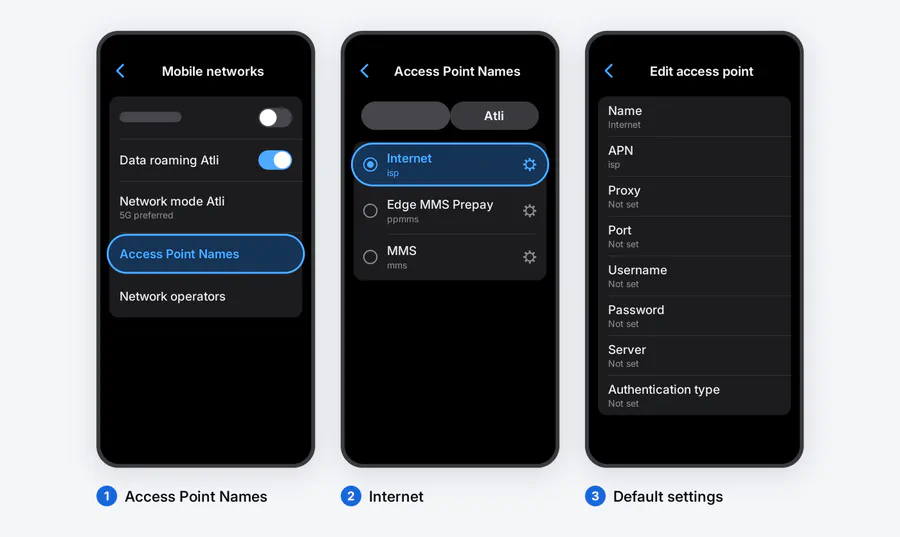
On a Google Pixel, APN information sits under Settings > Network & internet > SIMs > [your line] > Access point names. Google’s mobile network guide notes that the exact options depend on the carrier and Android version. Samsung and other Android manufacturers use similar menus with slightly different labels.
If the phone shows no eSIM menu at all, the question is not the APN but whether it supports eSIM and is carrier-unlocked.
Knowing where the setting lives does not mean you should change it. If you use Atli and the checks above have not worked, contact Atli through WhatsApp or Telegram with your destination, phone model and a screenshot of the mobile-network screen. That is safer than guessing at an APN value.
Checked against Atli’s current eSIM configuration and official Apple and Google device guidance, August 2026.