Apple’s spec page says the cellular iPad mini (A20 Pro) is “not compatible with physical SIM cards”. That holds in every country including mainland China. The Wi-Fi version (A3595) has no cellular connection, so it takes no SIM of any kind. This is Apple’s 2026 model and the eighth iPad mini, which is why many people call it the iPad mini 8.
What Apple announced on 26 October
Apple announced the iPad mini (A20 Pro) on 26 October 2026, took pre-orders from 28 October and sells it from 6 November. It has an 8.5-inch OLED display, the A20 Pro chip, an IP67 rating against water and dust, and 128, 256 or 512 GB of storage. In the US it starts at $699 for the Wi-Fi model and $849 for the Wi-Fi + Cellular model, so cellular costs $150 more.
The cellular model has Apple’s C2 modem and supports 5G. Apple says it reaches cellular speeds up to 50 percent faster than the previous iPad mini.
Which iPad mini models have a SIM tray
| iPad mini | Year | The cellular model takes |
|---|---|---|
| A20 Pro | 2026 | eSIM only |
| A17 Pro | 2024 | eSIM only |
| 6th generation | 2021 | Nano-SIM tray and eSIM |
| 5th generation | 2019 | Nano-SIM tray and eSIM |
The tray went in 2024. The 6th generation from 2021 was the last iPad mini to have one.
One cellular model everywhere except mainland China
Apple names two cellular models: A3596, and A3597 for mainland China. Its spec pages for the US, the UK, Singapore, Japan, Germany and Brazil all list A3596 with the same bands. Apple says an unlocked iPad “can also use eSIM plans offered by other carriers”, and that is what lets a mini bought at home take a travel eSIM abroad. An iPad bought from a carrier may be locked to it, so ask that carrier before you travel.
Apple sends A3597 buyers to China Unicom, which is the only carrier it lists for eSIM on iPad in mainland China. Each model has a limit that matters when you travel. Apple says iPads bought outside mainland China cannot install an eSIM profile from a mainland carrier, so an A3596 cannot use a local eSIM in China. Your home plan’s roaming or a travel eSIM installed before the trip will have to do. The A3597 has the reverse limit. Apple says it can install eSIMs from carriers outside China while it is outside mainland China, and Location Services has to be on. So if you set out from mainland China with an A3597, install the travel eSIM after you leave. Hotel Wi-Fi is a better place to do it than the airport’s.
Wi-Fi or cellular for travel
The Wi-Fi model gets online through Wi-Fi or through your phone. It cannot take an eSIM, and it has no GPS. Apple lists GPS for the Wi-Fi + Cellular model only and says devices without a cellular connection use only Wi-Fi to find their location. With no Wi-Fi networks around, a Wi-Fi mini cannot tell where it is.
The cellular model brings its own connection and its own GPS. The GPS needs no data plan. Apple’s advice for GPS accuracy on these iPads is to leave Cellular Data switched on “even if you’re not subscribed to a cellular data plan”. Maps downloaded at home then still show where you are. Offline maps do not sync between devices, so download them on the iPad itself. Apple Maps or Google Maps abroad covers what each app can do offline.
Expect a little less battery on mobile data. Apple rates the mini at up to 10 hours of web browsing on Wi-Fi and up to 9 on a cellular network.
If the mini only comes out on planes and in hotel rooms, the Wi-Fi model and your phone’s hotspot are enough. If it is the screen you navigate with on a road trip or a hike, buy the cellular model for the GPS.
The cellular mini has no phone number
The cellular mini does data and nothing else. Apple’s spec page lists “Data only”, and its user guide says cellular iPads do not get cellular phone service. Calls reach the iPad over data through FaceTime, WhatsApp and similar apps, and calls to your iPhone can ring on the iPad while the phone is nearby.

This is where a data-only travel eSIM fits. Atli is data-only, so on a phone the home SIM stays on beside it for calls and texts. The mini has no home line to keep.
Apple’s eSIM pages for iPad say an iPad stores eight or more eSIMs, and its user guide says only one is in use at a time. If you already pay a carrier for an iPad plan at home, that plan and a travel eSIM can sit side by side. You choose the active one in Settings, then Cellular Data, by tapping it below SIMs.
How to put a travel eSIM on the iPad mini
- Check the model. Open Settings, then General, then About. A part number sits next to Model Number, and tapping it shows the model number. A3596 or A3597 means you have the cellular model.
- Buy the plan and install it at home on Wi-Fi. Installing needs an internet connection, and airport Wi-Fi after you arrive is a poor place to try. Atli sells its plans in WhatsApp and Telegram, on heyatli.com and in the Atli app. The app is free on the App Store and runs on iPad. If you set out from mainland China with an A3597, install the eSIM on your hotel’s Wi-Fi after you leave instead.
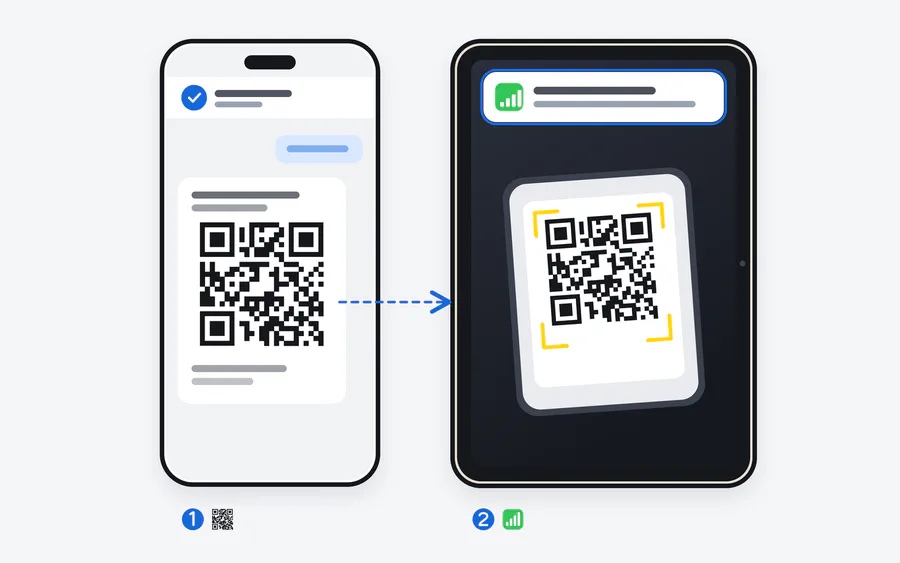
- Scan the QR code with the iPad. Open the QR code in the chat on your phone, point the iPad’s Camera at it and tap Cellular Plan Detected. The scanner under Settings, then Cellular Data, then Other works too, and it lets you type the SM-DP+ address and activation code instead when there is no second screen. On an iPad that already has a plan, tap Add a New Plan and follow the onscreen steps.
Do not tap Install in the chat on your phone. The one-tap button installs the eSIM on the device you tap it on, and an Atli eSIM cannot move to another device after that.
When you arrive
Open Settings, then Cellular Data. Tap the Atli plan below SIMs so it becomes the active one, and check that Cellular Data is on. Then open Cellular Data Options and turn on Data Roaming. Atli runs on partner networks abroad, so roaming has to be on, and Atli adds no roaming charge for it. The APN sets itself.
The plan starts when the iPad first connects to a network in a destination the plan covers, so you can install it days before you fly. Typing data in the chat shows the date you need to connect by. A plan that has not started by then expires.
To see what is left, type data or usage in the WhatsApp or Telegram chat where you bought the plan, or open the Atli app. The iPad’s own counter under Cellular Data shows which apps used it. How to check your eSIM data usage goes through both.
Moving from an older iPad
Apple’s Transfer iPad Plan moves a plan from an old iPad to a new one when the carrier supports it. It does not move an Atli eSIM. An Atli eSIM stays on the device it was first installed on, so the new mini needs a new plan, which comes with its own eSIM. Data left on the old iPad stays there, so use it up before you erase or sell that iPad. Every later plan for the new mini attaches to its eSIM, and nothing new needs installing.
If you bought the Wi-Fi model
A Wi-Fi mini gets online abroad through your phone. Put the travel eSIM on the phone and turn on Personal Hotspot. If both devices are signed in to the same Apple Account, the iPad joins without the password. How to use an eSIM as a hotspot has the steps for iPhone and Android.
One plan then covers both devices. Atli charges nothing extra for hotspot use, but everything the iPad downloads comes out of the phone’s plan. On Atli’s unlimited plans, hotspot traffic counts toward the plan’s 3 GB of high-speed data per 24 hours. The iPad also has to stay within Wi-Fi range of the phone.
A cellular mini can also share its own connection with a laptop through Personal Hotspot. Apple notes that Personal Hotspot is not available with every carrier.
Apple’s iPad mini spec pages, press release and iPad support pages, checked 31 October 2026. US launch prices.