Install your eSIM at home on reliable wifi before you fly. The setup needs an internet connection, while airport wifi can be slow or require a login you cannot complete yet. Once the Atli profile is on your iPhone, leave it installed and switch it on for data when you arrive.
Does my iPhone support eSIM?
Most iPhones from the XS and XR onward support eSIM, but the exact model and where it was purchased matter. In China mainland, Apple lists only the iPhone 17e, iPhone Air, iPhone 18 Pro, iPhone 18 Pro Max and iPhone Duo as eSIM-capable. Two quick checks:
- Dial
*#06#. If an EID number appears in the list, your phone supports eSIM. - Settings, then General, then About: if Carrier Lock says “No SIM restrictions”, you are unlocked.
If you are unsure, check whether your phone supports eSIM and is unlocked. Apple also keeps an official iPhone eSIM setup guide.
The three ways to install
Your eSIM arrives right in the chat after you buy, with all three options attached.
1. Install button
Tap the Install button in the chat message when iOS offers it, then confirm the setup screens.
2. QR code
If you are using the QR code:
- Open Settings, then Cellular, then Add eSIM.
- Choose Use QR Code.
- Point the camera at the QR code, shown on another screen, or tap to open it from your photo library if you saved the QR image to the same phone.
3. Manual entry
No second screen? Choose Enter Details Manually on the same Add eSIM screen, then copy the SM-DP+ address and activation code from the chat message into the fields.
What to switch on when you arrive
Leave the profile installed after setup. When you reach your destination, check these settings:
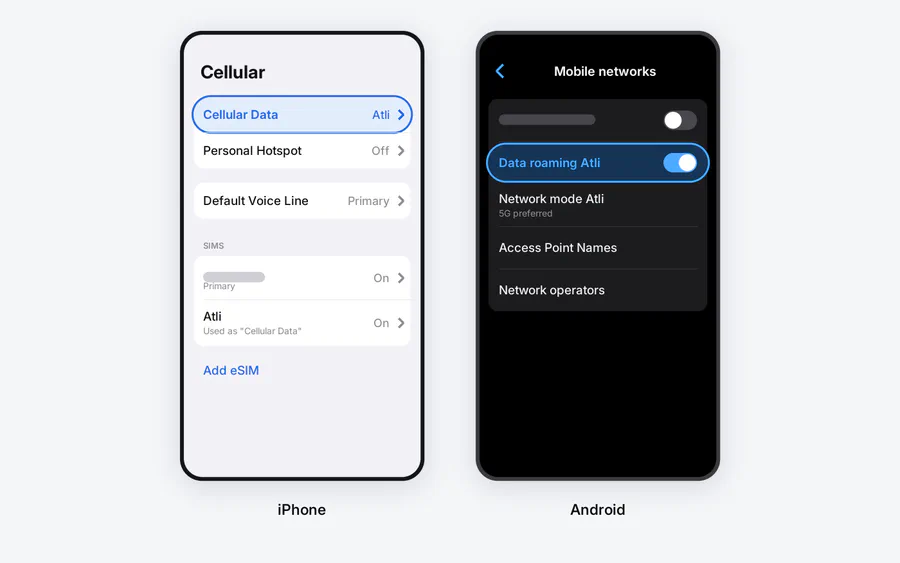
1. Make Atli your data line. Settings, then Cellular, then Cellular Data: pick the Atli eSIM. Your phone can hold several lines; this tells it which one carries the internet.
2. Turn Data Roaming on for Atli. Settings, then Cellular, tap the Atli line, and turn on Data Roaming. Atli uses partner networks abroad, so this setting must be on. It does not create a separate roaming charge from Atli.
3. Decide what your home SIM does. Atli is data-only and does not provide a phone number, SMS, or cellular calls. Your home SIM can stay active for your usual number, calls, and texts, but your operator’s roaming charges may apply. If you do not need that line, you can turn it off for the trip. WhatsApp and Telegram keep working over Atli data.
One more setting: on the Cellular Data screen, Cellular Data Switching lets the iPhone use data from both lines depending on coverage. Turn it off for the trip so data stays on the line you chose.
When you get home
Set Cellular Data back to your home SIM and switch the Atli line off. Do not delete it. The Atli eSIM profile stays on your phone even when a data plan expires, and any future plan you buy is added to that same profile automatically.
If the line is on but there is still no connection, use the eSIM no-data checklist before changing advanced settings. Atli configures its APN automatically, so you should not type one in yourself.
Checked against Atli’s current installation flow and Apple’s official eSIM and Dual SIM guidance, August 2026.
FAQ
When should I install my travel eSIM?
Which iPhones support eSIM?
*#06#: an EID number indicates eSIM support. In China mainland, Apple lists only the iPhone 17e, iPhone Air, iPhone 18 Pro, iPhone 18 Pro Max and iPhone Duo as eSIM-capable.