
Install your eSIM at home on reliable wifi before you fly. Android menu names vary by manufacturer: Samsung uses SIM manager, while Pixel uses SIMs. If your phone uses different wording, search Settings for “eSIM” or “SIM.” Once the Atli profile is installed, leave it on the phone and switch it on for data when you arrive.
Does my Android support eSIM?
Support depends on the exact model, sales region, and carrier lock. Google says every Pixel 4 and later supports eSIM, while Pixel 3 and 3a have regional and carrier exceptions. Samsung support also varies between regional versions of the same Galaxy model. Dial *#06#; an EID indicates that the phone has eSIM hardware. Then check that your exact phone supports eSIM and is unlocked.
Installing the eSIM
After you buy, the eSIM arrives in your WhatsApp or Telegram chat with three installation options:
- Install button: tap the button in the message when Android offers it, then follow the setup screens.
- QR code: on Pixel, open Settings, Network & internet, SIMs, Add SIM, then Set up an eSIM. On Samsung, open Settings, Connections, SIM manager, then Add eSIM. Scan the QR from another screen, or select the saved image if your phone offers that option.
- Manual: choose the manual option on the same screen and copy in the SM-DP+ address and code from the chat.
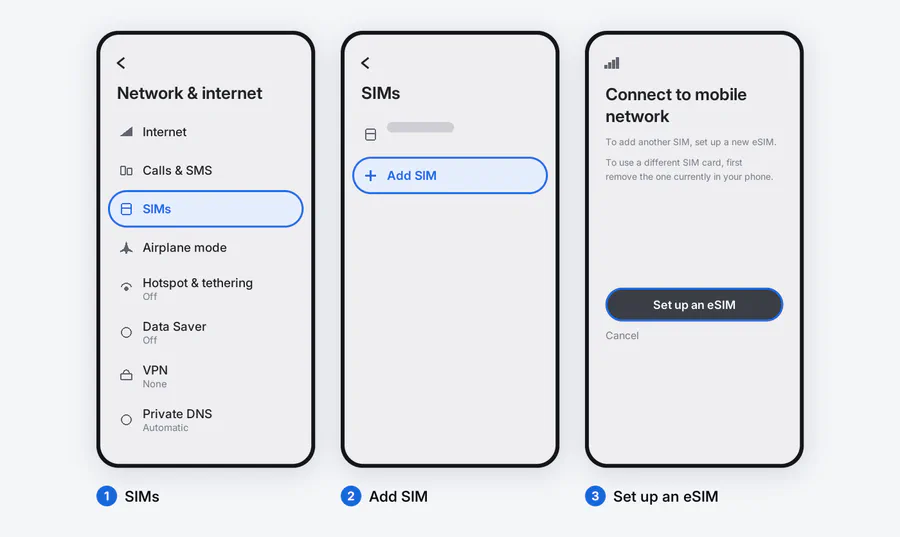
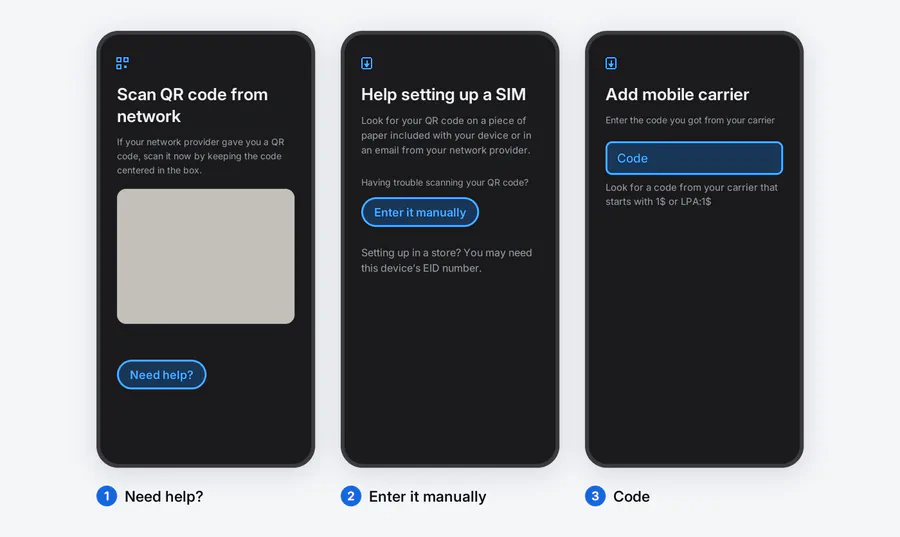
What to switch on when you arrive
1. Pick Atli for mobile data. Open SIM manager or SIMs and select the Atli eSIM for mobile data. If your phone offers one primary-SIM setting instead of separate choices for calls, texts, and data, check what will change before selecting Atli as primary.
2. Turn Data Roaming on for Atli. Atli uses partner networks abroad, so this setting must be on. If your phone has a roaming switch for each SIM, enable it only for Atli. It does not create a separate roaming charge from Atli.
3. Decide what your home SIM does. Atli is data-only and does not provide a phone number, SMS, or cellular calls. Your home SIM can stay active for your usual number, calls, and texts, but your operator’s roaming charges may apply. WhatsApp and Telegram work over Atli data.
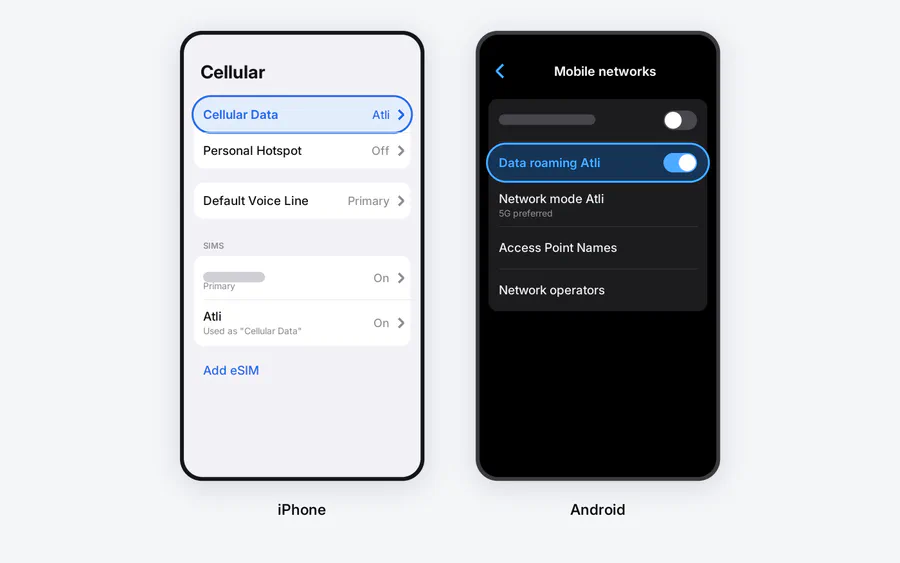
When you get home
Set mobile data back to your home SIM and switch the Atli line off. Do not delete it. The Atli eSIM profile stays on your phone when a data plan expires, and any future plan you buy is added to the same profile automatically.
If the line is on but there is no connection, use the eSIM no-data checklist. Atli configures the APN automatically, so do not type one in yourself.
Checked against Atli’s current installation flow and official Google Pixel and Samsung eSIM guidance, August 2026.
FAQ
Which Android phones support eSIM?
*#06#: an EID indicates eSIM hardware, but you should still check the exact model.