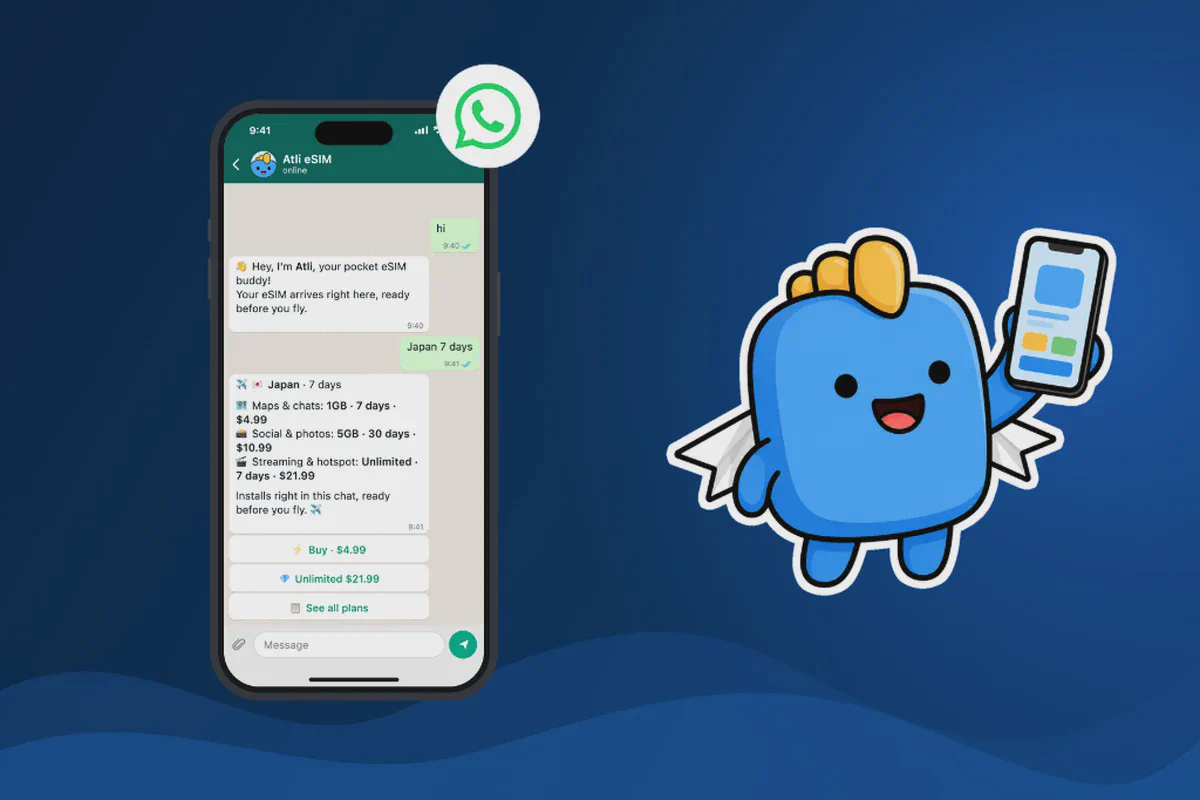
You can buy a travel eSIM directly through WhatsApp without downloading another app or visiting a SIM card shop. Services like Atli eSIM let you choose a destination and prepaid data plan in WhatsApp, open Stripe’s encrypted external checkout to pay, and receive your eSIM installation details back in the same WhatsApp conversation.
With Atli, you can buy eSIM data for 200+ countries through WhatsApp. You do not need to create an account, and you can keep your existing phone number while using your travel eSIM for mobile internet abroad.
Want to get connected before your next trip? Buy an eSIM on WhatsApp with Atli.
Can you buy an eSIM through WhatsApp?
Yes. Some travel eSIM providers allow customers to purchase and manage mobile data plans directly through WhatsApp instead of requiring a separate app or traditional online account checkout.
Atli is one of these providers, and the same chat flow also works in Telegram.
You open a WhatsApp conversation with Atli, tell it where you are traveling, select a data plan, complete the payment process, and receive the information needed to install your eSIM.
The process works for international travelers who want prepaid mobile data without buying a physical SIM card at their destination. Unlike a traditional SIM card, an eSIM is built into compatible smartphones. There is no plastic card to collect, insert, or replace.
How to buy an eSIM on WhatsApp in 5 steps
Buying a travel eSIM through Atli takes five steps in the chat.
Step 1: Open Atli on WhatsApp
Start a conversation with Atli through its official WhatsApp account (@atliesim, +1 424 445 3187): Chat with Atli on WhatsApp.
You can send a simple message like:
“Hi, I need an eSIM for Japan for 7 days.”
You do not need to visit a physical shop or download a separate travel eSIM app.
Step 2: Tell Atli your travel destination
Share the country you are visiting and how long you need mobile data:
- Japan for 7 days
- Thailand for 14 days
- United States for 30 days
- Europe for a multi-country trip
Atli supports travel eSIM plans in more than 200 countries, including regional and global options for trips involving multiple destinations.
Step 3: Choose your eSIM data plan
Atli shows available prepaid data packages for your destination. Depending on the destination, plans differ in:
- Data allowance, such as 1 GB, 3 GB, 5 GB, or larger fixed and unlimited options where available
- Validity period
- Total price
- Country, regional, or global coverage
Choose a plan that matches your travel habits. If you mostly use WhatsApp, Google Maps, and email, a smaller package can cover the trip. If you regularly stream video, upload photos and clips, or use your phone as a hotspot, choose a larger fixed plan or check whether an unlimited option is offered for your destination. You can review the total cost and pre-purchase checklist in the chat before paying.
Step 4: Pay for your travel eSIM
While you choose your plan inside WhatsApp, payment takes place on an external checkout page. When you tap the payment button in the Atli conversation, Stripe’s encrypted checkout page opens in your browser.
Atli uses a prepaid model, so you see the total price before you pay, with no recurring monthly subscription or automatic renewal.
Only complete payment on the official Stripe checkout page opened from the chat. Never send card numbers, banking passwords, or one-time verification codes as text in a WhatsApp message.
Step 5: Receive and install your eSIM
After payment is confirmed, your eSIM is delivered in the Atli WhatsApp conversation with a QR code and an Install my eSIM button. You can also type wallet in the chat at any time and select QR / Install to view your setup options.
Depending on your device, you can install the profile using direct installation, a QR code, or manual activation details.
Install your eSIM while connected to reliable Wi-Fi before traveling. Installing the profile does not start your plan’s validity clock: an Atli plan starts when the eSIM first connects to a supported network at your destination.
When you arrive at your destination, switch on the Atli eSIM, select it for mobile data, and enable data roaming for the Atli line. Your phone will then connect to a supported local network.
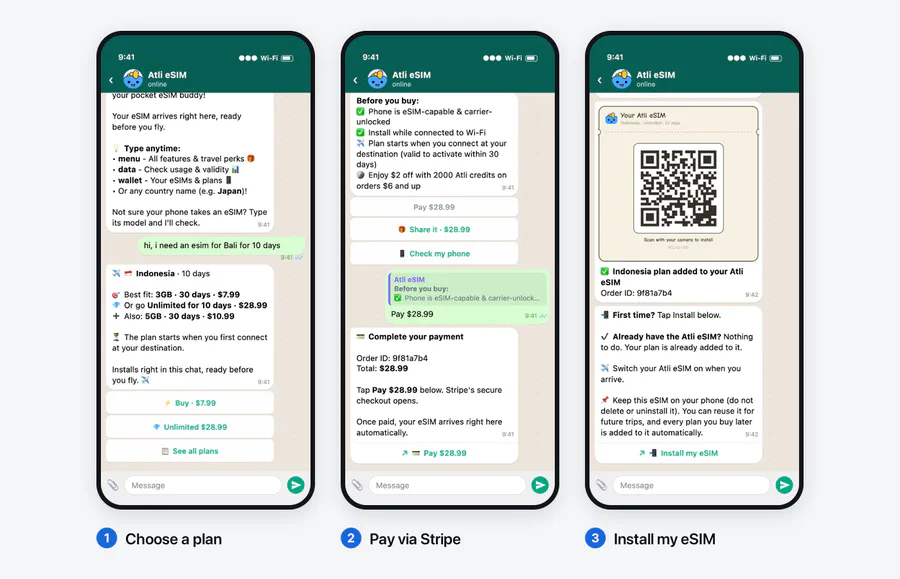
- Choose a plan, 2. Pay via Stripe, and 3. Tap Install my eSIM in WhatsApp.
Why buy a travel eSIM through WhatsApp?
Buying an eSIM through WhatsApp keeps your purchase, installation details, and plan management in one place while you prepare for an international trip.
No additional app required
If you already use WhatsApp, you can purchase your data plan through an existing chat app instead of installing another travel app or setting up a new login.
No physical SIM card
An eSIM is digital. You do not need to queue at an airport kiosk, wait for a delivery, or remove your home SIM card with an ejector pin.
Keep your existing phone number
Atli provides data-only travel eSIM plans. On a Dual SIM-compatible phone, your regular SIM can remain active for calls and SMS while Atli supplies mobile data. Turn Data Roaming off on your home SIM (and turn off Allow Cellular Data Switching on iPhone) so your phone does not use home-carrier background data. Keep in mind that if your home line stays active abroad, your home carrier may still charge roaming fees for voice calls, outgoing texts, or incoming SMS depending on your plan. See our Dual SIM travel guide for the full setup.
Your existing WhatsApp account also continues using the number it was originally registered with. You do not need to create a new WhatsApp account or change your number.
Buy before departure
You can purchase and install your travel eSIM at home within 30 days of departure, then switch the line on when you land. See Should you activate your eSIM before you fly? for pre-departure timing details.
Manage your data through chat
Atli lets you check your remaining data and manage your travel eSIM from the same conversation.
Type data or usage in the chat to see your remaining balance and validity, as explained in our guide on how to check your eSIM data usage. When you need more data or travel to another country, you can buy another plan in the chat and it attaches to the same Atli eSIM profile automatically. Never delete the Atli eSIM when a plan ends.
Which countries can you buy a WhatsApp eSIM for?
Atli provides prepaid travel eSIM plans covering 200+ countries and destinations. Popular options include:
| Destination | Travel eSIM available |
|---|---|
| Japan | Yes |
| Thailand | Yes |
| United States | Yes |
| United Kingdom | Yes |
| Indonesia / Bali | Yes |
| Singapore | Yes |
| South Korea | Yes |
| Vietnam | Yes |
| United Arab Emirates | Yes |
| European destinations (34-country regional plan) | Yes |
Traveling across several countries? Atli also offers regional and global eSIM plans. You can ask Atli about your itinerary directly in WhatsApp or explore the available options on HeyAtli.com.
Can you use WhatsApp with the eSIM you just bought?
Yes. You can use the same WhatsApp account both to buy your travel eSIM and to message or call while abroad.
WhatsApp is linked to your registered phone number, not to the SIM card that supplies your internet connection. When you activate an Atli travel eSIM for mobile data, WhatsApp continues working with your existing number:
- Send and receive WhatsApp messages
- Share photos, files, and live or pinned locations
- Make WhatsApp voice and video calls where local networks permit
- Participate in your existing WhatsApp groups
Your chats and contacts remain attached to your existing account.
Remember that an Atli travel eSIM is data-only and does not provide a new phone number, cellular voice calls, or SMS. If you need SMS verification codes sent to your regular number, keep your home SIM active with its data roaming turned off. Read more in Can I use WhatsApp with a travel eSIM?.
Does your phone support an eSIM?
Before purchasing, check two separate requirements: your phone must have eSIM hardware and must be carrier-unlocked. A phone can have eSIM hardware and still reject a travel eSIM if it is locked to a domestic operator.
- Check for eSIM hardware: Dial
*#06#. If an EID number appears on the screen, the phone contains eSIM hardware (or search Settings for Add eSIM or Download SIM). You can also send your exact phone model in the Atli WhatsApp chat to ask about compatibility. - Confirm the phone is carrier-unlocked: Having an Add eSIM menu does not prove that a phone is unlocked. On iPhone, open Settings > General > About and check that Carrier Lock reads No SIM restrictions. Android does not offer a single lock-status screen across all brands, so confirm directly with the carrier that sold the phone or test a SIM from another provider.
Many recent iPhone, Samsung Galaxy, and Google Pixel models support eSIM, but availability depends on the exact model number and country of purchase rather than the device family name alone. Check the full details in Is my phone eSIM compatible?, and see our step-by-step setup guides for iPhone and Android.
Is it safe to buy an eSIM through WhatsApp?
When buying a travel eSIM through WhatsApp, the chat is used to choose your plan and deliver your eSIM, while card payment takes place on an external encrypted checkout page.
Before completing a purchase in chat:
- Start the conversation from the provider’s official website or verified contact link.
- Review the destination, data allowance, validity period, and total price in the order summary before tapping the payment button.
- Complete payment only on the official Stripe checkout page that opens in your browser.
- Never send card numbers, banking passwords, or one-time security codes as text messages in the chat.
- Keep your order confirmation and eSIM card message in the chat until your trip is over.
Atli’s official WhatsApp account is username @atliesim and phone number +1 424 445 3187, linked directly from HeyAtli.com and this official WhatsApp link.
Buying an eSIM on WhatsApp vs. a traditional eSIM website
Both methods deliver a digital travel SIM. The difference is how you complete the purchase and manage your plan afterward.
| Feature | WhatsApp eSIM purchase | Traditional eSIM website |
|---|---|---|
| Choose your destination | Through chat | Through website |
| Compare data plans | In conversation | On plan pages |
| Download an app | Not required with Atli | Depends on provider |
| Receive installation details | Through chat | Usually by email or account dashboard |
| Get help | Continue the same conversation | Varies by provider |
| Check balance or buy more data | Type data or buy in chat | Through website or app |
Atli offers both options: purchase directly through WhatsApp or Telegram, or use HeyAtli.com to browse available packages.
Checked against Atli’s current WhatsApp purchase flow, eSIM lifecycle, and dual-SIM setup guidance, October 2026. Network availability, plan options, and coverage vary by destination.
FAQ
Can I buy an eSIM directly on WhatsApp?
Which eSIM provider sells through WhatsApp?
Do I need to download an app to buy an eSIM through WhatsApp?
Will I get an eSIM QR code through WhatsApp?
wallet in the WhatsApp conversation and choose QR / Install to access direct installation, the QR code, and manual setup details.Can I buy an eSIM for another country while I'm still at home?
Can I keep my WhatsApp number after installing a travel eSIM?
Can I buy more eSIM data using WhatsApp?
data or usage and buy additional plans in the same WhatsApp conversation. New plans are added to the same Atli eSIM profile automatically, so you do not need to install a new eSIM for future trips.Can I buy an eSIM on WhatsApp for iPhone or Android?
*#06# to check for an EID number and confirm with your carrier that the phone is unlocked before purchasing.